









How to Search for Your Tax Identification Number (TIN) Through MyTax
🔍 How to Find Your Tax Identification Number (TIN) via MyTax
In line with Malaysia's new e-Invoicing requirements, you may need to provide your Tax Identification Number (TIN) if you require an official invoice for business claims or tax deductions. The Inland Revenue Board of Malaysia (LHDN) has made it easy to find this number online.
💡 Why do I need this?
If you are booking a corporate trip or need to claim expenses from your company, we legally require your TIN to issue a valid e-Invoice.
🚀 Step-by-Step Guide to Retrieve Your TIN
Follow these simple steps to find your TIN on the official portal:
- Step 1: Visit the MyTax Portal
Go to the official website: https://mytax.hasil.gov.my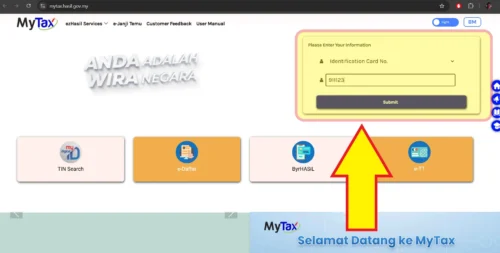
- Step 2: Log In
Enter your User ID and Password. (If you have never used MyTax, you may need to register first). - Step 3: Click 'Search TIN'
Look for the "Search TIN" button on the main dashboard menu.
- Step 4: Enter Details
Select "Individual" (for personal) or "Company". Enter your NRIC (Identity Card No.) or Passport Number. - Step 5: Get Your Number
Click "Search" and your TIN will appear. Copy and save this number to send to us for your booking invoice.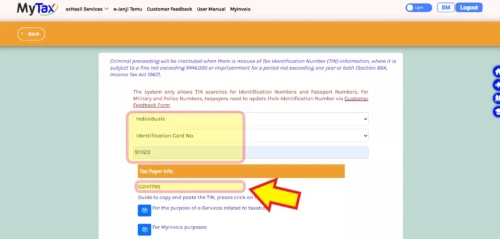
⚠️ Important Notes
- Privacy Warning: Please do not share your MyTax login details with anyone. Only share the final TIN number with our admin for invoicing purposes.
- Legal Penalty: Misusing TIN information is an offense under Section 66A of the Income Tax Act 1967.
- Need Help? If you cannot find your record, please contact the HASiL Care Line at 03-8911 1000.
